Introduction
Amelia Roberts, also known as the Copilot Queen, shares insights on Copilot and its capabilities within Microsoft tools. She addresses issues with connecting Copilot Studio agents to SharePoint as a knowledge source.
SharePoint Agents
Microsoft has introduced SharePoint agents, customized virtual assistants that can be integrated into SharePoint sites. These agents offer an easier alternative to creating custom virtual agents within Copilot Studio.
Licensing and Customization
SharePoint agents are available for free to Copilot license holders. Non-license holders can also utilize these agents with a pay-as-you-go meter connected to their Copilot license. While customization is possible, the Copilot Studio add-on feature is not yet available.
Adding a SharePoint Agent
Amelia demonstrates how to add a SharePoint agent to a site. She uses Allison's test group site at Pragmatic Works as an example. The process involves:
- Going to the "New" option in the top left corner
- Selecting "Agent New"
- Editing the agent's name and picture
- Saving the agent
Using the SharePoint Agent
Once added, the agent can summarize key highlights, create FAQs, and answer questions based on the site's resources. Amelia tests the agent's ability to pull information from a PowerBI boot camp file and an Adventure Works data set.
References and Customization
The agent provides references for the information it pulls, making it easier to locate specific documents within the SharePoint site. Advanced customization options will be available soon.
Integration with Teams
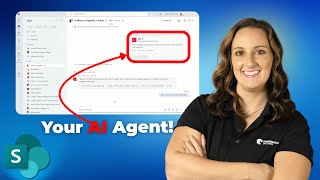
Amelia shows how to integrate the SharePoint agent with Teams. The agent can be added to a Teams chat, allowing users to reference it in conversations. The agent responds to prompts and provides information from the SharePoint site.
Benefits of SharePoint Agents
SharePoint agents simplify the use of Copilot Studio by tailoring the experience to the information within a SharePoint site. Permissions and security measures still apply, ensuring safe usage.
Conclusion
Amelia encourages viewers to learn more about Copilot and Copilot Studio by attending boot camps at Pragmatic Works. She highlights the ease of using SharePoint agents and their potential to enhance collaboration.
Don't forget to check out the Pragmatic Works' on-demand learning platform for more insightful content and training sessions on SharePoint and other Microsoft applications. Be sure to subscribe to the Pragmatic Works YouTube channel to stay up-to-date on the latest tips and tricks.






-1.png)
Leave a comment