


How Viva Insights Helps You Work Smarter
In this Pragmatic Works overview, Angelica Choo Quan introduces Microsoft Viva Insights as a practical way to better understand how work happens across the day. Productivity is often measured by output alone, such as completed tasks, delivered reports, and met deadlines. However, Angelica explains that the way work gets done matters just as much. Meeting overload, after-hours activity, and constant context switching can all affect both performance and well-being long before burnout becomes obvious. Viva Insights helps bring those patterns into view so individuals and organizations can work more intentionally.
What Microsoft Viva Insights Is
Angelica describes Microsoft Viva Insights as a privacy-protected experience that uses Microsoft 365 data, such as meetings and collaboration patterns, to provide useful insights about work habits. Users can typically access it through Microsoft Teams, though some features are also available through the web experience. Depending on a user’s role, the experience may look different and include different capabilities.
She highlights several key roles within Viva Insights:
- Insights Analyst: Access to advanced analysis, the web app, Copilot dashboard, and Copilot analytics reports when licensing requirements are met.
- Insights Administrator: Access to administrative features like organizational data and privacy settings.
- Business Leaders, Managers, and Delegates: Access to dashboards and analytics that help monitor broader adoption trends.
This setup allows Viva Insights to support both personal productivity and organizational strategy without focusing on invasive monitoring.
Personal Insights for Better Daily Work
Angelica begins with the personal insights experience, which is designed for individual employees. Only the individual can see their own data, making it a private space for reflection and planning. Personal insights can show how much focus time someone has during the week, whether their schedule is meeting-heavy, and if work is regularly happening outside normal hours.
She explains that the goal is not to dictate how people should work. Instead, Viva Insights helps users become more aware of how they are spending their time so they can make better decisions about energy, workload, and work-life balance.
Angelica walks through several personal insight features that stand out:
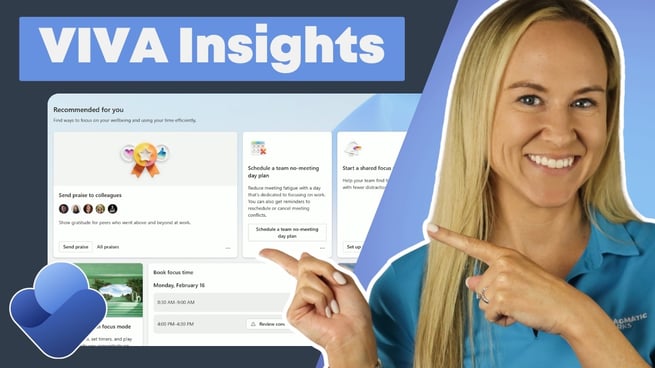
- Send Praise: Users can recognize colleagues by sending praise directly through chat or a Teams channel, complete with titles, notes, and backgrounds.
- No Meeting Day: Employees can schedule recurring days with no meetings to create uninterrupted time for deep work.
- Shared Focus Plan: Focus time can be blocked on the calendar so individuals and teams have dedicated time to concentrate.
- Focus Mode: Users can launch a focus session, choose its length, set breaks, and even connect tasks powered by Microsoft To Do.
- Mindfulness Breaks: Quick reminders encourage users to pause, breathe, and reduce stress during busy days.
These features make Viva Insights more than a reporting tool. According to Angelica, it becomes a system for helping people create better work habits one decision at a time.
Protecting Time and Building Healthier Habits
Another area Angelica emphasizes is how Viva Insights helps users protect time. She shows that employees can book focus time, review conflicts, and track progress around meetings, breaks, and learning. This makes it easier to set aside time not only for project work, but also for personal growth and recovery.
One especially useful feature is the ability to schedule learning time each week. Angelica notes that this can be valuable for someone preparing for a certification exam or trying to build new skills. Users can choose how much time they want to dedicate and whether they prefer to learn in the morning or afternoon.
She also highlights several settings that support healthier work routines:
- Work Week Settings: Define normal working hours and establish quiet time outside those hours.
- Protect Time: Mute mobile notifications from apps like Outlook and Teams during selected hours or days.
- Schedule Send Suggestions: Outlook may recommend sending emails the next business day instead of after hours.
- Lunch Hours: Create recurring calendar blocks to protect time for a real lunch break.
- Virtual Commute: Set a daily reminder to wrap up work, finish loose ends, and transition out of the workday.
- Reflection Prompts: Check in personally and reflect on how the day went.
- Effective Meetings: Automatically shorten meetings to create small buffers between calls.
Together, these settings help users reduce overload and create a more sustainable rhythm throughout the week.
Using the Copilot Dashboard to Drive Adoption
Angelica then shifts to the Copilot dashboard, which focuses on organizational insight rather than individual monitoring. This dashboard helps leaders understand where Microsoft Copilot is being used, how adoption is changing over time, and where additional training may be needed.
For example, organizations can see how many licensed users are active and which Microsoft apps are seeing the strongest Copilot usage. Angelica points out that this kind of visibility can reveal where adoption is strongest, such as in Teams or Outlook, and where more enablement may be needed in tools like Word, Excel, PowerPoint, OneNote, or Loop.
Rather than tracking people, the Copilot dashboard supports smarter decisions about training, change management, and overall adoption strategy.
Why Viva Insights Matters
Angelica closes by reinforcing that Viva Insights is about helping people work with more intention. It supports employees by making focus, learning, breaks, and boundaries easier to build into the workday. It also supports managers and leaders by showing broader patterns that can guide training and encourage healthier collaboration habits.
For organizations using Microsoft 365, Viva Insights can become a valuable part of creating a more balanced and productive workplace. As Angelica makes clear, the real value is not in tracking activity. It is in helping work feel more manageable, more focused, and more sustainable over time.
Don't forget to check out the Pragmatic Works' on-demand learning platform for more insightful content and training sessions on Microsoft Viva and other Microsoft applications. Be sure to subscribe to the Pragmatic Works YouTube channel to stay up-to-date on the latest tips and tricks.
Sign-up now and get instant access

ABOUT THE AUTHOR
Shortly after graduating from the University of Florida in 2012, Angelica moved to Jacksonville and began her career as a high school Biology teacher. As a trainer at Pragmatic Works, her primary goal is to help individuals feel more comfortable and confident using Power BI. While not in the office, she enjoys traveling around the city of Jax to check out local eateries, live music events, and performing arts.
Free Community Plan
On-demand learning
Most Recent
private training


Leave a comment