In this introductory video, Manuel Quintana dives into the concept of deployment pipelines in Fabric, a platform that became generally available (GA) in November 2023. This video will help you understand the purpose of deployment pipelines and how to leverage them for organizational content management.
Purpose of Deployment Pipelines
Deployment pipelines are a built-in tool in Fabric, offering users a streamlined approach to managing their organizational content lifecycle. The tool helps you develop, test, and deploy your content to production workspaces efficiently. This process ensures that only the tested and refined content reaches the production environment, minimizing disruptions and errors.
Getting Started with Deployment Pipelines
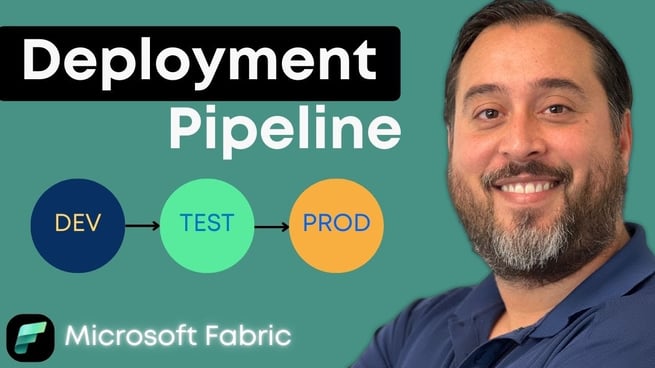
To get started, Manuel walks us through a basic setup involving three stages: Development (dev), Testing (test), and Production (prod). This is the classical approach used by many organizations. However, it's important to note that if you already have a workspace setup, you can start assigning workspaces to these stages, even if they aren’t initially structured as such.
Creating a Deployment Pipeline
The first step is to create a new pipeline. You can name your pipeline and assign stages based on your needs. For example, you can stick with a default three-stage setup or customize it to your organization’s requirements. The flexibility to add or remove stages makes this tool adaptable to various deployment needs.
Assigning Workspaces to Stages
Once your pipeline is created, you assign your workspaces to the respective stages (dev, test, prod). This ensures that changes made in the development stage can be properly tested in the test stage before reaching production. Manual or automated processes can then be used to move artifacts between these stages.
Managing the Process
After setting up the stages, you can deploy the content from the development workspace to the testing workspace. This step is crucial as it ensures that changes in development are properly validated before being pushed to production. Manual deployment options are available to ensure you only move content that’s ready for testing or production, avoiding unnecessary errors in the production environment.
Deployment Rules and Automation
As the deployment process evolves, you can automate several aspects using Fabric's REST API. Additionally, deployment rules can be configured to handle specific scenarios. For instance, if a semantic model from the development environment needs to be adjusted when moved to the test stage, deployment rules help manage such changes automatically.
Ensuring Data Consistency Across Stages
It is essential to ensure that the data in your test and production environments is consistent. A notable feature of Fabric’s deployment pipeline is the ability to track changes across stages and synchronize them efficiently. The video highlights the importance of understanding how artifacts are moved between stages and how to handle any discrepancies that may arise.
Advanced Features and Future Automation
While this video provides a beginner’s introduction, there’s much more to deployment pipelines. Future videos will explore advanced topics, such as leveraging Fabric's API for automation and integrating Git for continuous integration/continuous deployment (CI/CD). These advanced features offer more control over the deployment process and can further streamline workflows.
Conclusion
Fabric deployment pipelines are an excellent tool for managing the content lifecycle in your organization. By ensuring that changes are carefully tested and deployed, you can maintain a high level of quality control. With features like deployment rules and the potential for automation, Fabric provides a robust platform for handling even complex deployment scenarios.
For more in-depth learning, don’t miss the on-demand Fabric Analyst class, which provides a comprehensive introduction to Fabric artifacts and how to effectively use pipelines in your workflows.
Don't forget to check out the Pragmatic Works' on-demand learning platform for more insightful content and training sessions on Fabric and other Microsoft applications. Be sure to subscribe to the Pragmatic Works YouTube channel to stay up-to-date on the latest tips and tricks.






-1.png)
Leave a comment